← samtrest.com

MusicManager

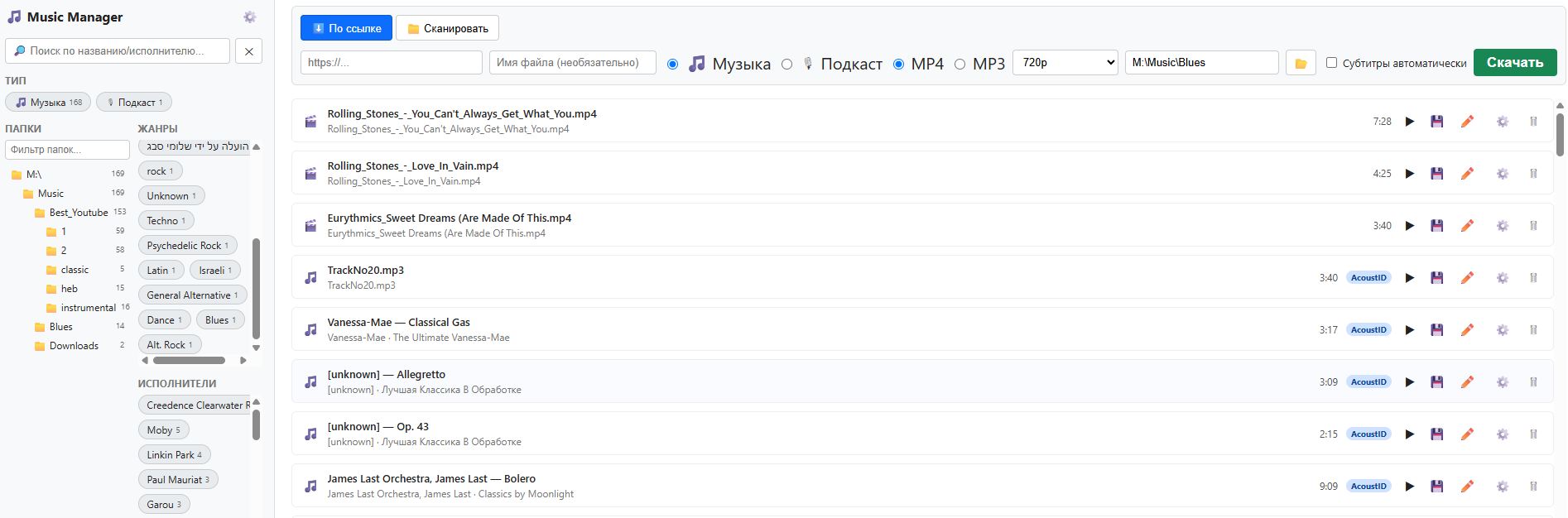
One searchable library for every track — scanned, downloaded, or imported. Automatic recognition, sounds-alike matching, whole-library duplicate cleanup, and drag-and-drop organizing, running as your own private server on your own network.

Download (Windows) MusicManager Interface
Why MusicManager?

🎵

One Unified Library

Scan a folder, drop in a single file, or download from a URL — every track lands in the same searchable library with the same rich tags, no separate lists to manage.

🔍

Automatic Recognition

ID3 tags first, then audio fingerprinting via AcoustID and Shazam, then a text search on iTunes and MusicBrainz as a last resort — all free, all automatic, no manual typing required.

🧬

Sounds-Alike Matching

Every track is fingerprinted by actual audio content — tempo, timbre, pitch profile — so you can find tracks that sound similar, not just ones with matching tags.

🔁

Whole-Library Duplicate Cleanup

One click scans everything and groups tracks that are the same recording — copied into different folders over the years — so you can review, keep, or delete with confidence.

🖱️

Drag, Drop, Organize

Drag any track onto a folder in the tree to copy or move it there — no path-typing, no leaving the library view.

🌐

Reads Any Script

Hebrew, Cyrillic, and Arabic tags mangled by old taggers are automatically repaired, and Japanese/Chinese/Korean titles are translated to Russian the moment you open them.

🌳

Folders, Genres, Artists

Browse your real folder structure in a live directory tree, or filter instantly by genre and artist — every list sorted alphabetically and independently scrollable.

🎙

Podcasts, Not Just Music

Flag a file as a podcast up front and MusicManager skips music-tag recognition entirely — you get a free-text Subject field instead of a genre.

✏️

Manual Tags When You Need Them

Every field is editable by hand — genre and year from a dropdown, everything else free text — and a manual correction is protected from ever being overwritten by a rescan.

🔒

Private by Design

Runs as a lightweight local web server on your own network. Your library never leaves your machine except for the free public lookups used to identify a track.

Four tries, one track

Behind every automatically-tagged file is the same recognition cascade — each step only runs if the one before it came up empty:

  • Free, No API Juggling: AcoustID needs one free key; Shazam, iTunes, and MusicBrainz need none at all.
  • Never Overwrites a Better Answer: A confident ID3 tag is trusted as-is — the network is only asked when a file has nothing usable.
  • Encoding-Safe: Old Hebrew/Cyrillic/Arabic tags mis-saved as Latin-1 are automatically detected and recovered, not left as garbled text.
  • Speaks Your Language: Japanese, Chinese, and Korean titles are auto-translated to Russian the moment you open the tags editor.
  • Source Badge on Every Row: See at a glance whether a tag came from ID3, AcoustID, Shazam, search, or a manual edit.
01
ID3 Tags
Read directly from the file first — if the title and artist are already there, nothing else runs.
↓ nothing usable?
02
AcoustID Fingerprint
The audio itself is fingerprinted and matched against the MusicBrainz database.
↓ still nothing?
03
Shazam Second Opinion
A second, independent fingerprint database is tried before giving up on audio matching.
↓ last resort
04
Search by Name
The filename is parsed into an "Artist – Title" guess and searched by text — iTunes first for a cleaner mainstream match, MusicBrainz as a fallback.
By Link
Paste a URL, pick music or podcast, choose where to save — tagging runs automatically once the download finishes.
📁
Scan in Place
Point at a folder or a single file — nothing is copied or moved, tags are read where the file already lives.
⚙️
Subtitles & Dubbing (rarely)
Tucked behind one icon for the rare video file that needs translated subtitles or an AI-dubbed voice track. Long recordings are split at natural pauses so a two-hour file never runs out of memory, and a job survives a server restart instead of vanishing.

Two ways in, one library out

MusicManager doesn't force you to choose between "download manager" and "tag library" — both roads lead to the same rich, searchable place:

  • Native File Dialogs: Pick a folder or file straight from a real Windows dialog, no path-typing required.
  • No Duplicate Copies: Scanning indexes files where they already sit on disk.
  • Play Right Away: Stream any track or video straight from the library list, subtitles included when available.

Years of downloads, finally sorted out

Copied a song into three different "best of" folders over the years? One scan finds every group of duplicates across your whole library — grouped, not just listed one pair at a time:

  • Instant, Whole-Library Scan: Thousands of tracks compared in under a second — no waiting, no per-track clicking.
  • See Exactly Where Each Copy Lives: Every row shows its folder, so you can tell real duplicates from a coincidence at a glance.
  • Listen Before You Decide: Play any copy right from the list to confirm before removing one.
  • Your Choice, Every Time: Delete from the library and disk, or just stop tracking it and keep the file — never a silent, irreversible default.
🔁 Duplicates in Library (245 groups)
Group 1 · 5 files
Maroon 5 — Wake Up Call 📁 Best_Youtube\1
Maroon 5 — Wake Up Call 📁 Disk4
Group 2 · 3 files
Chris Rea — The Blue Cafe 📁 Rea - Greatest Hits CD1
Chris Rea — The Blue Cafe 📁 Blues3